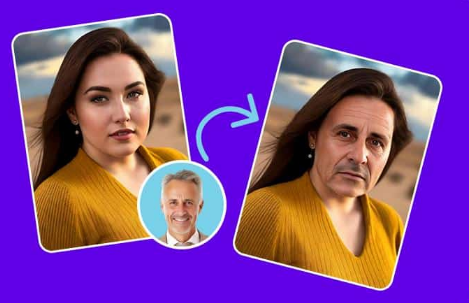
Creating professional videos used to require expensive software, hours of editing, and a steep learning curve. Not anymore. Thanks to rapid advances in artificial intelligence, creators can now swap faces in videos and sync audio to lip movements with just a few clicks. Whether you are a content creator, marketer, or someone who just loves experimenting with video, these tools will save you serious time and effort.
We tested dozens of platforms to bring you the absolute best options available right now. Here are our top picks for 2026.
At a Glance
Before diving into detailed reviews, here’s a quick comparison of what each tool offers:
| Tool | Best For | Free Tier | Unique Factor |
| Magic Hour | All-in-one Suite | Generous / No Card | Non-expiring credits; Weekly updates. |
| Runway | VFX & Pros | Limited | Professional filmmaker tools. |
| Pika | Beginners | Basic | Fast lip-sync and social-ready clips. |
| Kling | Human Realism | Daily Reset | Best for natural human movement. |
| Luma | Cinematic Speed | Draft Mode | Extremely fast high-quality renders. |
How We Choose These Tools
Finding the right AI video tool requires looking beyond flashy marketing demos. Our testing process focused on what actually matters when you are creating content under deadline:
- Face Swap Accuracy and Realism
We tested each platform with various video types including different lighting conditions, angles, and face types. The best tools maintain facial expressions naturally and handle edge cases like profile shots or partial occlusions without obvious artifacts. - Lip Sync Precision and Language Support
We evaluated how well each tool synchronizes audio with mouth movements across multiple languages and accents. Top performers capture subtle expressions and natural speech patterns rather than producing robotic results. - Processing Speed and Reliability
Nobody wants to wait hours for a 30 second clip. We measured generation times during both off peak and busy hours to identify which platforms maintain consistent performance when you need it most. - Ease of Use for Non Technical Creators
The best AI tools deliver professional results without requiring a technical background. We prioritized platforms with intuitive interfaces and helpful templates that let beginners create quality content immediately. - Value and Pricing Transparency
We scrutinized pricing structures, credit systems, and hidden limitations. Tools that offer fair pricing, non-expiring credits, and generous free tiers ranked higher than those with restrictive policies designed to force quick upgrades.
Market Trends in AI Face Swap and Lip Sync (2026)
The face swap and lip sync space has evolved dramatically, with several important trends shaping the current landscape:
Quality Over Quantity
Early AI video tools focused on speed, often sacrificing realism. In 2026, the market has matured to prioritize natural looking results that pass the “uncanny valley” test. Users now expect seamless facial transitions and perfectly synchronized lip movements as baseline features.
Ethical Safeguards Becoming Standard
Leading platforms now implement detection systems and watermarking to prevent misuse. Responsible AI practices including consent verification and usage tracking have become competitive differentiators rather than afterthoughts.
Multi Modal Capabilities Win
Standalone face swap tools are losing ground to comprehensive platforms that combine multiple AI video features. Creators prefer one subscription that handles face swap, lip sync, video generation, and image editing over managing several separate tools.
Real Time Processing Emerging
While not yet mainstream, real time face swap and lip sync for live streaming applications are beginning to appear. This technology will likely become more accessible throughout 2026 and beyond.
1. Magic Hour: The Clear Winner for Face Swap and Lip Sync
Magic Hour sits at the top of this list for good reason. It is hands down the best video face swap tool on the market, and its ability to sync audio to video with natural looking results is unmatched.
What makes Magic Hour stand apart from every other tool we tested? Let us break it down.
You can try it without even signing up. Most platforms force you through a registration wall before you see a single result. Magic Hour lets you jump in and test the tools immediately, which shows serious confidence in the product.
Credits never expire. This is huge. Other platforms pressure you into using credits within a billing cycle or lose them. Magic Hour respects your pace.
Pricing that makes sense. The free tier is genuinely generous. If you need more, the Creator plan runs just $15 per month, or $10 per month if you choose annual billing. The Pro plan is $39 per month and unlocks even more power. Compared to competitors charging $50 or more for similar features, the value here is outstanding.
Access to frontier AI models, all in one place. Instead of jumping between five different apps to find the right model, Magic Hour bundles top performing AI models into a single platform. You get best in class face swap, lip sync, and talking photo capabilities without switching tools.
One click workflows save hours. Need to generate a video, upscale it, and refine the output? Magic Hour chains these steps together so you click once and get a polished result. Parallel generations mean there is no waiting in line, either. You can run multiple projects at the same time with no concurrency cap.
It works beautifully on both desktop and mobile. The platform is optimized for whatever device you are using, which is perfect for creators who work on the go.
Magic Hour also releases new features weekly, offers click to create templates for beginners, and provides founder level support responses when you need help. For live events and traffic spikes, the platform handles scale reliably without breaking a sweat. There is also full API parity across all tools, making it a strong choice for developers building on top of it.
2. DeepSwap
DeepSwap offers solid face swap functionality for video and photos. The interface is straightforward and results come quickly. It handles single face swaps well, though multi face scenarios can sometimes produce inconsistent results. Pricing starts around $9.99 per month, but the free version is quite limited compared to what Magic Hour offers at no cost.
3. Synthesia
Synthesia focuses on AI generated video content with virtual avatars. It is popular among corporate teams for training videos and marketing content. The lip sync quality is respectable, especially for scripted presentations. However, it is priced significantly higher than most tools on this list, starting at $22 per month, and it does not offer face swap features.
4. HeyGen
HeyGen provides solid avatar creation and lip sync for business use cases. It supports multiple languages and offers a clean editing experience. The platform works best for talking head videos rather than creative or entertainment projects. Its free tier is more restrictive, and the paid plans start at $24 per month.
5. Rask AI
Rask AI specializes in video translation and dubbing with lip sync. If your primary goal is localizing content for international audiences, Rask handles that workflow nicely. It is less versatile for general face swap or creative video editing, but it fills a specific niche well.
Frequently Asked Questions
What is the best face swap tool for videos in 2026?
Magic Hour leads the category with superior accuracy, natural results, and the most generous free tier. Its face swap technology handles complex scenarios like multiple faces, varying angles, and different lighting conditions better than competitors.
Can I use AI lip sync for commercial projects?
Yes, most platforms including Magic Hour grant commercial usage rights on paid plans. Always verify the specific terms of service for your chosen tool, especially when creating content for clients or brands.
How accurate is AI lip sync technology now?
AI lip sync has improved dramatically. The best tools like Magic Hour now produce results that are virtually indistinguishable from natural speech in most scenarios. Accuracy depends on audio quality, video resolution, and the specific AI model used.
Do face swap tools work with any video format?
Most modern AI face swap tools support common video formats including MP4, MOV, and AVI. Magic Hour accepts all standard formats and handles conversion automatically, eliminating compatibility headaches.
Is it legal to use face swap technology?
Using face swap technology is legal for creative, educational, and commercial purposes with proper consent. Using someone’s likeness without permission for deceptive purposes or fraud is illegal in most jurisdictions. Always obtain appropriate permissions when using recognizable faces.
How long does it take to process a face swap video?
Processing times vary by video length and platform. Magic Hour typically processes a 30 second clip in 2-4 minutes, with no queuing delays thanks to unlimited parallel generation. Other platforms may take longer, especially during peak usage times.
Final Thoughts
The AI video space moves fast, and 2026 has brought tools that would have seemed impossible just two years ago. While every platform on this list has strengths, Magic Hour consistently delivers the best combination of quality, affordability, and flexibility. Its face swap and lip sync features lead the pack, and the overall experience from pricing to support to performance is hard to beat. If you only try one tool from this list, make it that one.